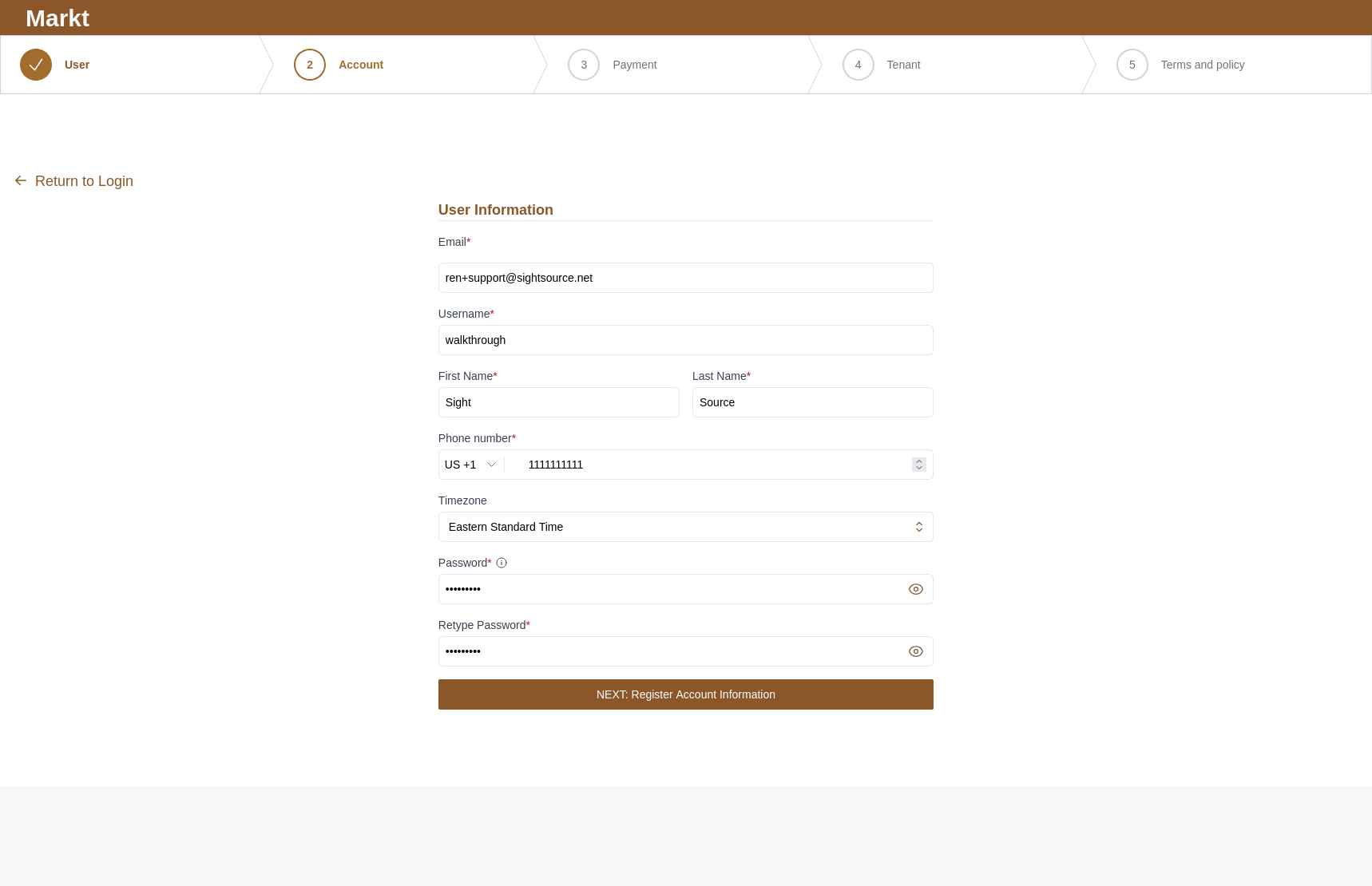
Step 1: User Registration
-
User Information Fields
-
Email: Enter your primary contact email address. This will be used for account verification and official communications.
-
Username: Choose a unique handle for your profile.
-
Full Name: Provide your First Name and Last Name in the designated side-by-side text boxes.
-
Phone Number: Select your country code (e.g., US +1) from the dropdown and enter your mobile or primary contact number.
-
Timezone: Select your local timezone from the dropdown list. This ensures that timestamps and notifications within the platform are accurate to your location.
-
-
Security
-
Password Creation: Enter a strong password. You can click the eye icon on the right side of the field to toggle visibility and ensure you haven't made any typos.
-
Retype Password: Confirm your chosen password by entering it again in the second field.
-
-
Moving Forward
Once all fields are accurately filled, click the brown button labeled NEXT: Register Account Information. This will save your details and move you to Step 2: Account Creation.